Samsung SmartTag
- 3.1
- Rating
- 10.00K
- Installs
- Free
- Price
 Analysis by App-foxy
I approached Samsung SmartTag as a practical companion for people who already use Samsung’s tracking-tag ecosystem, rather than as a general-purpose library or demonstration app. Its store summary points to work with Samsung Galaxy SmartTag and other smart-tag brands, so the central question is simple: does it make tag-based item finding useful in daily life, and is it worth adding to your phone?
The app is free, which makes trying it a low-risk decision. It is published by Boss Inc and sits in the Libraries & Demo section, an unusual placement for something intended to support smart tags. That classification does not tell me how useful it will be in a hallway, office, car park, or crowded bag, but it does suggest that the app is presented more as a compatibility or demonstration tool than as a complete lifestyle platform.
What the app is really useful for
I find that the most useful starting point is to decide what you want a tag to do before adding it to your routine. I would choose one frequently misplaced item, give its tag a clear name, and check that the pairing and search steps make sense when I am not in a hurry. That small test helps separate a genuinely helpful setup from an extra app that merely duplicates a habit I already have.
You May Also Like

 AccuWeather: Weather Radar
AccuWeather Review: A Quick, Clear Forecast for Everyday Decisions
For everyday plans, the best forecast is the one you can understand quickly. AccuWeather makes rain timing, radar, and local conditions easy to act on, with a few trade-offs.

 Hill Climb Racing
Why Hill Climb Racing Still Turns Crashes Into One More Run
A tiny car, a bumpy hill and one more upgrade: Hill Climb Racing keeps resurfacing because its simple chaos makes every near-miss feel personal.

 AliExpress - Shopping App
AliExpress Makes Global Shopping Feel Personal, but Shoppers Bear the Risk
AliExpress turns a global marketplace into a pocket-sized discovery engine. Its reach is useful, its shopping loop compelling, and its trade-offs easy to miss.

 Lords Mobile: Kingdom Wars
Lords Mobile Is a Kingdom-Building Routine, Not a Quick Match
A case-by-case verdict on the building, battles, device demands, and social commitments that make Lords Mobile rewarding for some players and exhausting for others.

 PDF Scanner app - TapScanner
TapScanner Makes Paperwork Easier to Capture, Check, and Share
TapScanner makes scanning with a phone feel less like a rescue operation and more like a dependable step in getting work done. Its capture tools are useful, though not flawless.

 Block Blast!
 Shows How Much a Puzzle Game Can Leave Out
A quiet grid game shows why puzzle players increasingly value instant clarity, repeatable skill and low-pressure play—and where the genre still needs to catch up.
More From Our News Desk
View All News


A simple role in a smart-tag setup
The most sensible way to view this app is as a bridge between a phone and compatible tracking tags. A tag can be attached to something that is easy to misplace, while the phone provides the interface for interacting with it. That can be helpful for keys, a backpack, luggage, a work case, or another object that regularly disappears under furniture or gets left in a different room.
I would not install it expecting a full replacement for every tracking service on a phone. The useful experience depends heavily on the tag brand, the phone environment, and the way the application handles the particular device. The store summary specifically highlights Samsung Galaxy SmartTag and other smart tags, so compatibility should be treated as the first practical checkpoint before building a system around it.
For a Samsung user, the appeal is obvious. Instead of treating a SmartTag as an isolated gadget, the app gives the tag a place in a broader phone workflow. For someone who owns a different phone brand or uses tags from several unrelated manufacturers, the situation is less straightforward. A general tracking platform with clearly documented support may be a better fit when mixed hardware is the priority.
A realistic morning use case
Imagine leaving for work while carrying a laptop bag, keys, and a small travel case. One of those items is not where you remember putting it. With a compatible tag attached, the phone can become the starting point for locating the missing object instead of forcing you to search every room from memory. The value is not that the app makes an item impossible to lose; it is that it can shorten the frustrating part of the search.
That distinction matters. A tracking app is most useful when it changes your routine before an item goes missing. I would label tags clearly, keep one tag assigned to one important object, and test the setup at home before relying on it outside. A tag that has never been checked in a real situation is not a dependable safety net just because it appears in an app.
There is also a useful habit here for shared spaces. If a tag is attached to a family item or a work case, the person using the object should know what the tag is for and where the app fits into the recovery process. Otherwise, the technology becomes another hidden accessory that nobody remembers to check.
Free access changes the decision
Because the app is free, the main value question is not whether the software itself justifies a subscription or purchase. The relevant cost is the time spent setting it up and any compatible tag hardware a user may already own or decide to use. I would therefore judge it as a free utility whose usefulness depends on the surrounding device ecosystem, not as a standalone product with a complete value proposition.
That is a favorable position for experimentation. If you already have a compatible SmartTag, installing the app can be reasonable simply to see whether it fits your routine. If you do not own a tag, downloading the app alone will not create a tracking system. The free price removes one barrier, but it does not remove the need for compatible hardware.
This is also why I would avoid comparing it directly with paid productivity apps. The comparison is not about paying for more menus or a premium feature set. It is about whether this free app helps you use a physical tag more effectively than the phone’s usual tracking option or the manufacturer’s own software.
How I would evaluate the everyday experience
For everyday use, I would judge the experience by whether it reduces the time and guesswork involved in finding a tagged object, not by how often I open the app. I would also test it in the places where I actually misplace things, since a setup that works at home may feel different during a rushed departure or while handling luggage. The next section looks at the practical situations where that distinction matters.
Start with one important item
My preferred setup would begin with one object that causes repeated inconvenience, such as a key ring or a travel bag. Starting small makes it easier to notice whether the app actually improves retrieval. It also avoids a common mistake: attaching tags to everything before learning which alerts, labels, and location habits are genuinely useful.
After pairing or configuring the tag, I would test three situations separately. First, I would check whether the phone can identify the tag when both devices are nearby. Next, I would place the tagged item in a familiar but inconvenient location, such as another room or inside a bag. Finally, I would test the process after leaving the item behind and returning later. These checks reveal more than a quick installation because they show whether the app supports the moments when users are most likely to need it.
A practical tip is to use labels that describe the object rather than the tag itself. “Front-door keys” is more useful than “Tag one,” especially when several tags are present. This small organizational choice can reduce hesitation during a rushed search and makes the app easier to understand months after setup.
Do not confuse tracking with recovery
Smart-tag software can help you find an object, but it does not eliminate the limits of the tag or the surrounding phone connection. A misplaced item may be behind a cabinet, inside a vehicle, or in a location where the available connection is unreliable. The app should be treated as a search aid, not a guarantee that every object can be located instantly.
That is one of the most important tradeoffs for new users. The convenience is real when the tag and phone cooperate, but expectations need to stay realistic. I would still keep important documents, medication, passports, and irreplaceable items protected through ordinary habits rather than relying on this app as the only safeguard.
Another practical limitation is that the benefit may be difficult to notice until something goes missing. That can make the app feel unnecessary on ordinary days. In my view, this is normal for tracking tools: their value is occasional but potentially significant. The right question is not whether you open it constantly, but whether it reduces stress during the moments when a tagged item disappears.
Where it differs from usual alternatives
The usual alternatives fall into two groups. One is the phone maker’s native tracking experience, which may be the most natural choice for users already committed to a particular ecosystem. The other is a dedicated third-party tracking service designed around its own tag family. Those options can be preferable when they offer clearer device support, a more familiar interface, or better integration with the rest of your phone.
This app’s position is narrower and more practical: it is attractive when it works with the Samsung Galaxy SmartTag or another supported smart tag and when the user wants a free way to interact with that hardware. It is less compelling as a universal answer for every tag brand. Someone comparing several ecosystems should first decide which hardware platform they trust, then choose the software that supports it most consistently.
I also see a difference in confidence. A mature, manufacturer-centered tracking system may feel easier to rely on because the hardware and software are designed as one experience. With an app placed in a libraries and demo category, I would be more deliberate about testing compatibility and behavior before using it for an important trip. That is not a claim that it cannot work; it is a sensible response to the app’s positioning.
Small workflow improvements that matter
One useful workflow is to assign tags according to the places where objects are normally stored. If a tagged item has a regular home, the app is mainly a backup for interruptions to that routine. If an item travels daily, the tag becomes more valuable because it protects against leaving it in a café, office, vehicle, or another temporary location.
A second tip is to check the system before travel rather than after arriving at a destination. Confirm that the tag is still associated with the intended object and that you understand the steps needed to search for it. This takes little time and prevents the worst kind of failure: discovering unfamiliar controls while standing somewhere crowded and impatient.
A third tradeoff concerns how many tags to manage. More tags can cover more belongings, but they also create naming and maintenance work. I would add them gradually and remove entries for objects that are no longer tagged. A short, accurate list is easier to trust than a crowded list filled with old assignments.
Who is likely to get the most value
I think the best fit is someone who already has compatible tag hardware and wants a straightforward way to use it for ordinary belongings. People managing several tag brands, expecting a complete inventory, or needing personal-safety monitoring should compare other tools first. With that in mind, I would focus on whether the app solves one recurring problem reliably before making it part of a wider setup.
Best fit for Samsung-oriented households
The strongest audience is someone who already uses a Samsung Galaxy phone and owns, or plans to use, a compatible Samsung SmartTag. For that person, the free app is worth testing because it addresses a specific problem without requiring an immediate software purchase. It can be especially useful for people who regularly misplace keys, bags, equipment, or luggage.
It may also suit households where several people need a simple shared understanding of tagged objects. The value comes from making the recovery process familiar: identify the item, open the relevant tool, and begin searching. The app is not a substitute for communication, but it can give the household a concrete starting point when something is missing.
People who travel with valuable but replaceable equipment may also appreciate the extra layer of awareness. A tag cannot protect an object from theft or guarantee recovery, yet knowing whether a bag has been left behind can still be useful. I would describe that as situational value rather than full security.
Who should probably skip it
I would skip this app if you do not use compatible smart tags and have no intention of adding them. Without the physical tag relationship, there is little reason to keep a dedicated tool installed. I would also hesitate if you need one polished service for a mixed collection of tags from different brands and phones.
Users who expect a sophisticated inventory system may be disappointed as well. The core idea is finding tagged objects, not managing a complete household asset database. If your priority is cataloging possessions, tracking warranties, or organizing documents, a dedicated inventory app will be more suitable.
Finally, anyone who needs guaranteed, professional-grade location monitoring should look beyond a free consumer tag companion. The right tool depends on the risk involved. For ordinary misplaced belongings, a tag can be sensible. For high-stakes tracking, I would investigate a service designed specifically for that responsibility rather than assuming this app covers it.
What the current listing suggests about maturity
The app has an average rating of 3.0 from around a hundred ratings, with a smaller group of written reviews. I read that as a reason to keep expectations measured. The rating does not tell me exactly which devices or situations produced positive or negative experiences, but it does suggest that the application may not feel equally polished for everyone.
It has passed the ten-thousand-install mark, so it is not an entirely unknown experiment. Even so, that reach is modest compared with widely established tracking platforms. I would treat the install count as evidence of some real interest, not as proof that compatibility will be perfect on every phone.
The current version is 18.0.0, and the app supports Android 7.0 and later. That broad operating-system reach can help people with older Android devices, although an older phone may still behave differently from a newer Samsung model. Before depending on it for travel, I would test the exact phone-and-tag combination I plan to use.
The age rating is Everyone, which fits a straightforward utility for locating tagged belongings. That does not make every use case risk-free, though. Users should still think carefully about what they attach a tag to, who can access the phone, and whether a tagged item contains sensitive information. The rating describes audience suitability, not a promise about every privacy or security concern a user might have.
Questions I would answer before installing
If you are wondering whether the app works without a SmartTag, my practical answer is that its purpose is tied to smart-tag use. Install it when you have compatible hardware to test, not merely because the name sounds like a general Samsung utility.
If you are asking whether it replaces every other tracking service, I would say no. Its usefulness is strongest inside the tag combinations it supports. A phone’s native tool or a dedicated alternative may be better when your devices are outside that ecosystem or when you want one established platform for many products.
If you are concerned about the free price, there is no software purchase required to try it. The more important financial decision is the compatible tag hardware. I would choose the hardware first, confirm that the app supports it, and only then build a larger setup.
If you want to know whether it is suitable for a child’s safety or continuous personal monitoring, I would not use it as the sole answer. A smart tag attached to an object is not the same as a purpose-built safety service, and the app’s role is better understood as item finding.
If you are unsure whether to keep it installed after testing, use a simple rule: keep it if it makes one recurring search easier. If it adds confusion, fails with your tag, or duplicates a native tool you already trust, removing it is reasonable.
My final recommendation
I see Samsung SmartTag as a narrowly useful, free app rather than a must-have download for every Android owner. Its strongest case is clear: you have a Samsung Galaxy SmartTag or another compatible smart tag, you regularly misplace physical belongings, and you want to test a no-cost companion before committing to a larger tracking routine.
The tradeoff is equally clear. The experience depends on compatibility, the app’s moderate average rating encourages caution, and a tracking tag is only a helpful search aid rather than a guarantee of recovery. I would test one tag thoroughly, name it clearly, and use it on an everyday object before trusting the setup with luggage or important equipment.
For the right Samsung-centered user, that is enough to justify trying it. For someone seeking a universal tracker, a polished inventory manager, or a personal safety system, I would choose a more specialized alternative. My verdict is therefore a cautious recommendation: worth trying when you already have compatible tag hardware, easy to skip when you do not.
FAQs for Samsung SmartTag
01What is the primary function of the Samsung SmartTag?
The Samsung SmartTag is a small, Bluetooth-enabled device designed to help you track and locate items such as keys, bags, or even pets. By attaching it to your belongings, you can easily find them using the SmartThings app on your compatible Samsung device. It works within a certain Bluetooth range and uses the Galaxy Find Network for broader searches.
02How does the Samsung SmartTag work with my smartphone?
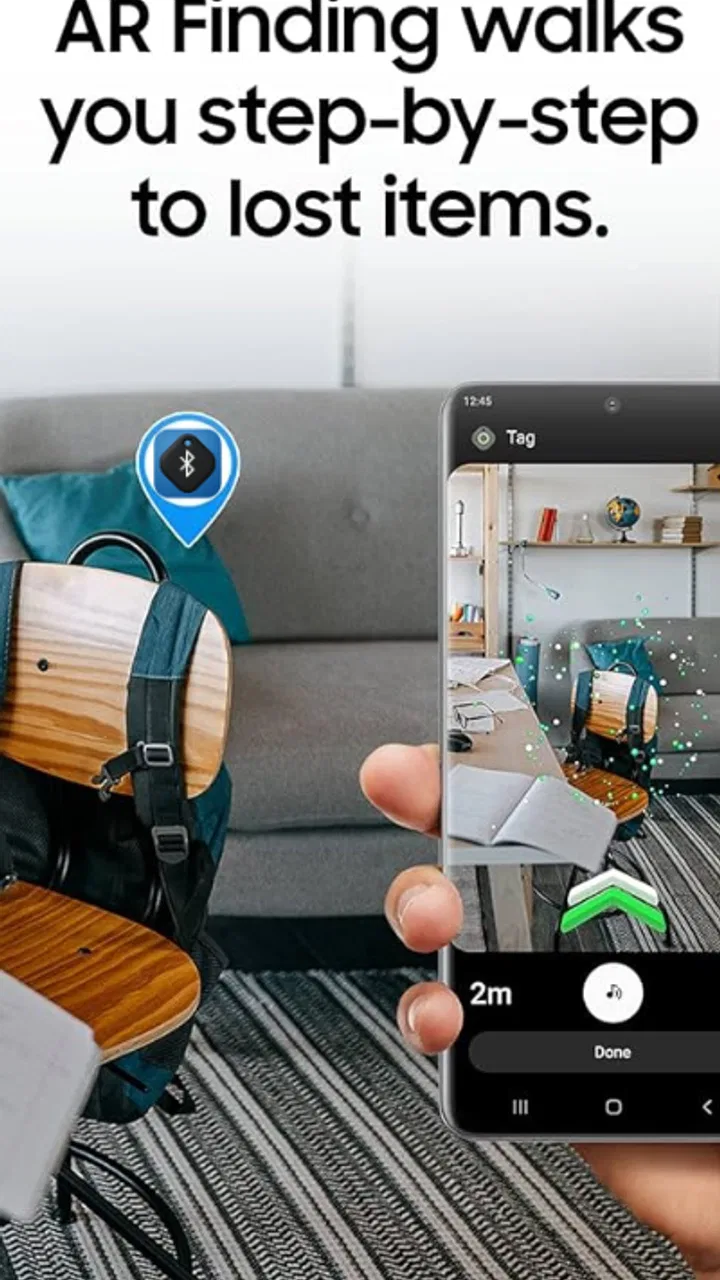
The Samsung SmartTag connects to your smartphone via Bluetooth and integrates with the SmartThings app. Once paired, you can use the app to locate your item on a map, trigger the SmartTag to emit a sound, or use the AR Finder feature for precise location tracking. Make sure your device is compatible with Bluetooth Low Energy (BLE) for optimal performance.
03What is the battery life of the Samsung SmartTag, and can it be replaced?
The Samsung SmartTag boasts a battery life of about 300 days, depending on usage. It uses a CR2032 coin cell battery, which is easily replaceable. This ensures that you can continue using the SmartTag without needing to purchase a new device once the battery runs out, making it a cost-effective solution for long-term use.
04Is the Samsung SmartTag compatible with non-Samsung devices?
While the Samsung SmartTag is optimized for Samsung Galaxy devices, it can work with other Android phones that support Bluetooth Low Energy (BLE) and the SmartThings app. However, some features, such as the AR Finder, may be limited or unavailable on non-Samsung devices, so it’s best to check compatibility before purchasing.
05How secure is the data when using a Samsung SmartTag?
Samsung SmartTag prioritizes user privacy and security. It uses end-to-end encryption to ensure your location data is secure while transmitting between the SmartTag and your device. Additionally, the Galaxy Find Network aids in locating your SmartTag anonymously, without revealing your personal information to other users. Always keep your app updated for the latest security enhancements.
Pros
- Easy to set up and use with Samsung devices.
- Long-lasting battery for extended use.
- Compact design fits easily on keychains.
- Accurate tracking with precise location updates.
- Integrates well with SmartThings app.
Cons
- Limited compatibility with non-Samsung devices.
- Relies heavily on Bluetooth range.
- No built-in speaker for sound alerts.
- Requires Samsung account for full features.
- May drain phone battery faster with constant use.

Samsung SmartTag
Gallery